Learning IR remotes with the VS1838B
Elena's VS1838B infrared receiver software can learn the raw timing of buttons from compatible IR remotes instead of requiring a preprogrammed remote protocol. The project was developed and tested on the Raspberry Pi Pico platform, with preliminary Arduino support included in the source.
Title and date
Learning IR remotes with the VS1838B — August 31, 2026
Development stage
Working Raspberry Pi Pico prototype with additional platform support under evaluation.
Goal
Create a reusable IR receiver and remote-code learning tool that can capture an unknown remote, assign readable names to its buttons, and generate source code for use in Elena's firmware.
The learner records raw mark-and-space timing rather than assuming a specific protocol. This allows it to work with compatible infrared remotes from many manufacturers, not only one predefined handset. It does not apply to RF, Bluetooth, or other non-infrared remotes.
Components used
- Raspberry Pi Pico or Raspberry Pi Pico 2 W
- One or more VS1838B active-low demodulating IR receiver modules
- Compatible infrared remote control
- USB connection and serial terminal software
- Shared 3.3 V power and ground
What changed
The IR receiver utility captures unknown button transmissions, measures their timing in microseconds, combines repeated transmissions, and assigns readable button names. Its LIST command generates reusable ir_codes.h and ir_codes.c files for an application.
The software was developed on the Raspberry Pi Pico platform using the Raspberry Pi Pico SDK. Arduino support has been added, but it has not been fully tested on Arduino hardware.
Wiring or schematic
For one VS1838B receiver on a Raspberry Pi Pico or Pico 2 W:
| VS1838B connection | Raspberry Pi Pico connection |
|---|---|
| VCC | 3.3 V |
| GND | GND |
| OUT | GPIO 15 |
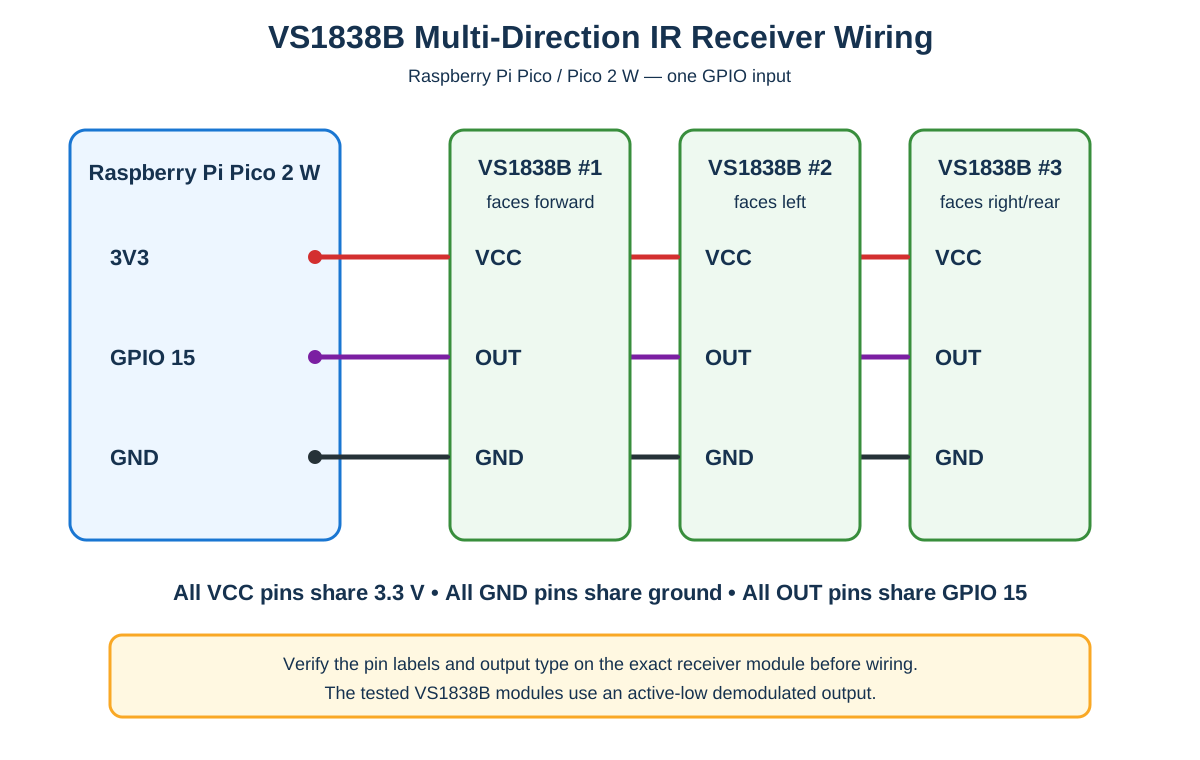
Multiple VS1838B modules were tested facing in different directions. All modules used the same 3.3 V power source and common ground, and their signal lines were tied together at GPIO 15. This provides wider directional coverage while consuming only one Pico I/O pin.
The receiver modules used in this test have active-low demodulated outputs. Before tying signal outputs together, verify the pin labels, operating voltage, and output type of the exact module being installed; VS1838B carrier boards do not always use the same physical pin order or output circuitry.
For the Arduino implementation, the default receiver input is digital pin 2. The Arduino pin can be changed with IR_RX_PIN, and the Pico capture pin can be changed with IR_GPIO.
Software changes
The complete source code, Raspberry Pi Pico project, Arduino sketch, generated-code example, and usage instructions are available in the public repository:
David Harmor's IR Receiver and Remote-Code Learner source code
The normal capture workflow is:
- Connect to the board's serial interface.
- Enter
CAPTURE. - Enter a readable name for the next button.
- Press that button on the remote.
- Repeat for the remaining buttons.
- Enter
EXIT, followed byLIST, to generateir_codes.handir_codes.c.
An application calls ir_remote_init() once and repeatedly calls ir_remote_poll() to receive the learned button codes.
Test results
| Test | Expected | Observed | Result |
|---|---|---|---|
| Learn buttons from different compatible IR remotes | Capture raw timings without a fixed protocol | Button timings and names were captured | Pass |
| Generate reusable source | Produce header and implementation sections | ir_codes.h and ir_codes.c were generated |
Pass |
| Decode learned buttons on Raspberry Pi Pico | Return the assigned button name | Learned buttons were recognized | Pass |
| Use multiple receivers on one signal input | Improve directional coverage without more GPIO pins | Receivers facing different directions worked with tied signal lines | Pass |
| Arduino compatibility | Compile and operate through the Arduino platform hooks | Support is implemented but hardware testing is incomplete | Not fully tested |
Problems encountered
A single IR receiver has a limited field of view, which makes remote operation unreliable when Elena is approached from different directions. Supporting multiple receivers with separate GPIO inputs would also consume pins needed by other sensors and controls.
IR remotes use different protocols and timing patterns, so a decoder written for only one standard would unnecessarily restrict the remotes that could be used.
Solution
Place multiple compatible VS1838B receivers around Elena, power them from the same 3.3 V rail, connect them to the common ground, and tie their tested-compatible active-low signal outputs to one GPIO input. The software captures raw timing data and generates a code table for the actual remote being used.
Photographs/video
Photographs of the final receiver placement and a demonstration video will be added after the sensors are mounted on Elena's chassis.
Next steps
- Test the Arduino implementation on representative Arduino boards.
- Record the exact VS1838B carrier-module part numbers and pin order used on Elena.
- Mount receivers to provide front, side, and rear coverage.
- Test reception range and reliability under indoor lighting and sunlight.
- Integrate the generated button table into Nolena's command handling.